Multimedia Tools
Configure MiniMax credentials to enable video, speech, image, and music generation.
When to Use This
To enable video, speech, image, and music generation, you need to configure MiniMax credentials locally first.
Step 1: Get Group ID and API Key
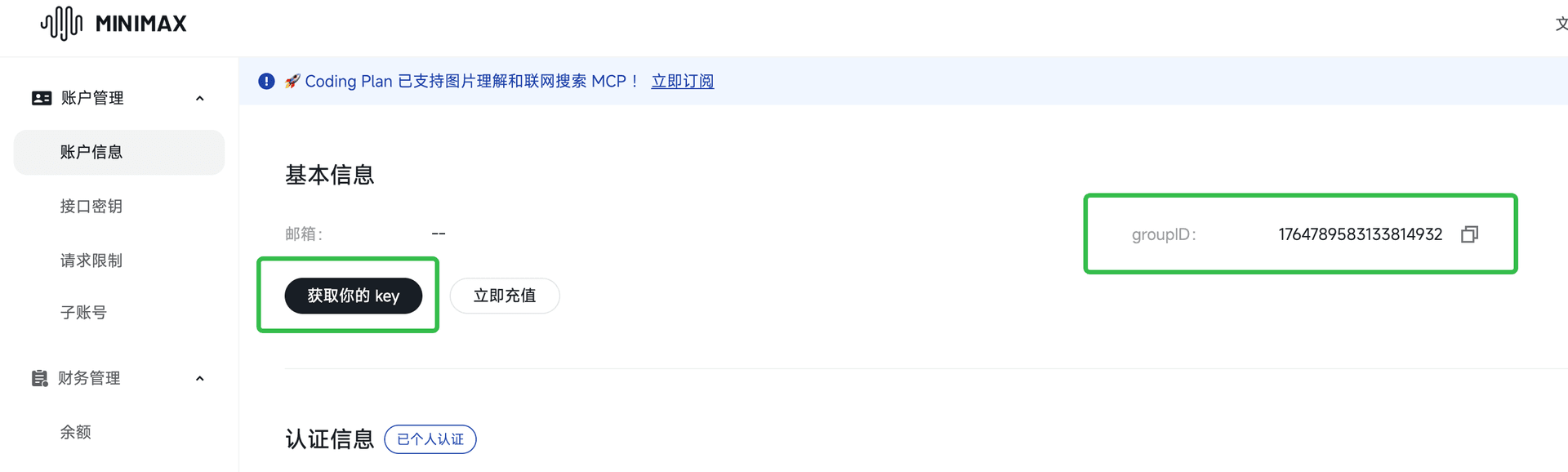
- Sign in to MiniMax User Center - Basic Information
- Copy your groupID
- Click Get your key, then generate and copy your API KEY
Step 2: Create 4 tool directories under your home folder
Create the following directories under your user home directory (Windows / macOS):
.minimax_music.minimax_video.minimax_speech.minimax_image
Windows home directory example:
C:\Users\your-username\
macOS home directory example:
/Users/your-username/
Step 3: Put config.key into each directory
In all 4 directories, create a config.key file with the same content:
global:
  group-id: "your groupID"
  api-key: "your API KEY"
Recommended folder structure:
home/
├── .minimax_music/
│   └── config.key
├── .minimax_video/
│   └── config.key
├── .minimax_speech/
│   └── config.key
└── .minimax_image/
    └── config.key
After this setup, video, speech, image, and music generation capabilities will be available.